Imagine this.
You solve a graph problem on LeetCode late at night. The verdict turns green. You close the tab and move on.
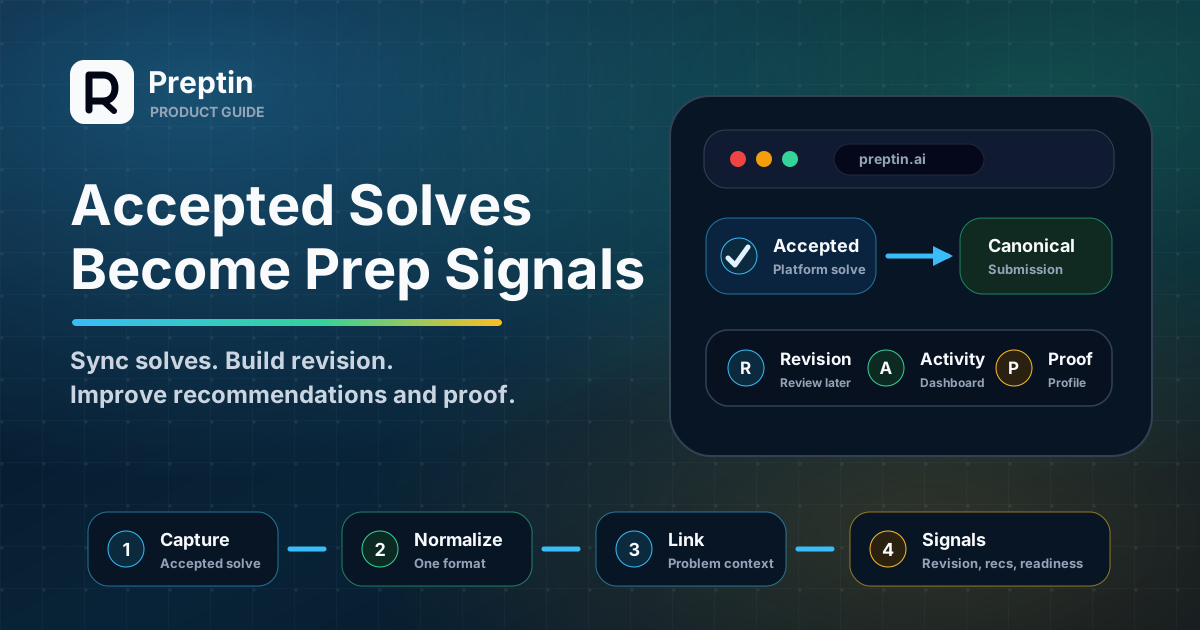
Without Preptin, that solve can become one more green tick buried inside a platform profile. With Preptin, it can become part of your prep system:
- Your dashboard gets a new activity signal.
- The problem can count as solved.
- A matching challenge or recommendation can move forward.
- A revision plan can bring the problem back later.
- Your public profile or GitHub export can use it as proof where enabled.
That is the real idea behind submission tracking. Preptin is not trying to collect submissions for the sake of collecting submissions. It is trying to make every accepted solve teach the system something useful.
The Short Version
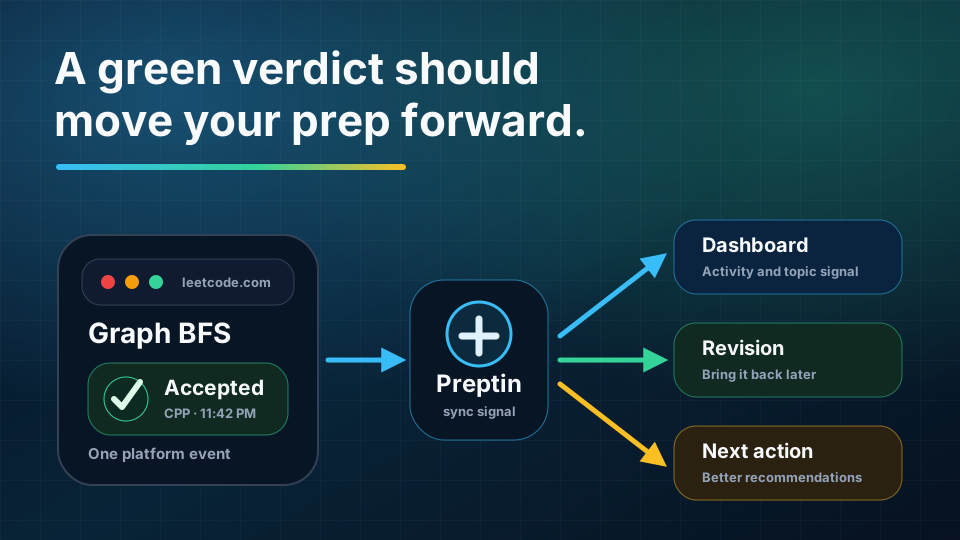
Preptin tracks accepted submissions so your practice can become useful signal instead of scattered history.
The basic flow looks like this:
- You solve a problem on a supported coding platform.
- The browser extension or another supported sync flow helps Preptin capture or import the submission.
- The submission is normalized into a Preptin submission record.
- Preptin connects it to the matching problem when possible.
- Accepted solves update progress, activity, revision, recommendations, and readiness signals.
- The submission remains available in your submission history for review.
The goal is simple: your solved problems should not disappear into scattered platform history.
A Solve Story
Here is what one accepted solve can do.
You solve Graph BFS on a supported coding platform. Preptin captures or imports the accepted submission where that flow is supported. The submission is linked to a problem, topics, patterns, result status, language, and timing where available.
From there, Preptin can update the connected surfaces:
| Before sync | After sync |
|---|---|
| "I think I practiced graphs recently." | The graph solve appears in submission history. |
| "I need to remember to revise this." | A revision workflow can bring it back later. |
| "Did that recommendation count?" | A matching recommendation can be completed. |
| "Did my challenge progress update?" | A matching challenge can be marked complete where supported. |
| "Can I show this progress later?" | Profile or export surfaces can use trusted activity where enabled. |
One solve is not the whole story. But it is a real event, and real events are what make Preptin more useful over time.
Why This Matters
Most candidates already solve across multiple places.
You may use LeetCode for DSA, Codeforces for contests, CodeChef for practice, GeeksforGeeks for topic work, or another platform for company-style questions. Each platform knows a piece of your preparation, but no single platform understands the whole interview-prep picture.
That creates a quiet problem.
You may know that you practiced "a lot," but still be unsure about:
- Which topics you actually covered.
- Which problems you solved recently.
- Which older solves are fading from memory.
- Which weak areas are still under-practiced.
- Whether your practice matches your target company or role.
- What to solve next.
Accepted submissions help Preptin answer those questions with evidence instead of guesswork.
A manual checklist can say "I marked this problem done." An accepted submission says "this problem was solved on a coding platform, at this time, with this result." That makes the signal harder to lose and easier to trust.
Where the Browser Extension Fits
The browser extension is an important part of setup for platform flows that need page context, account proof, or supported submission capture.
Preptin is not asking you to move all practice into a new editor. You can keep solving on the coding platforms you already use. The extension helps Preptin sit beside that workflow and understand the right context.
Depending on the platform and feature, the extension can help with:
- Finishing platform verification from the profile page.
- Detecting the current problem while you solve.
- Capturing accepted-submission details where that flow is supported.
- Keeping problem context, snippets, and revision plans closer to the platform page.
This is why extension setup matters before you judge whether tracking is working. If a platform flow depends on the extension, Preptin may not have enough context until the extension is installed, enabled, signed in, and allowed to run on the supported platform page.
What Preptin Reads From a Submission
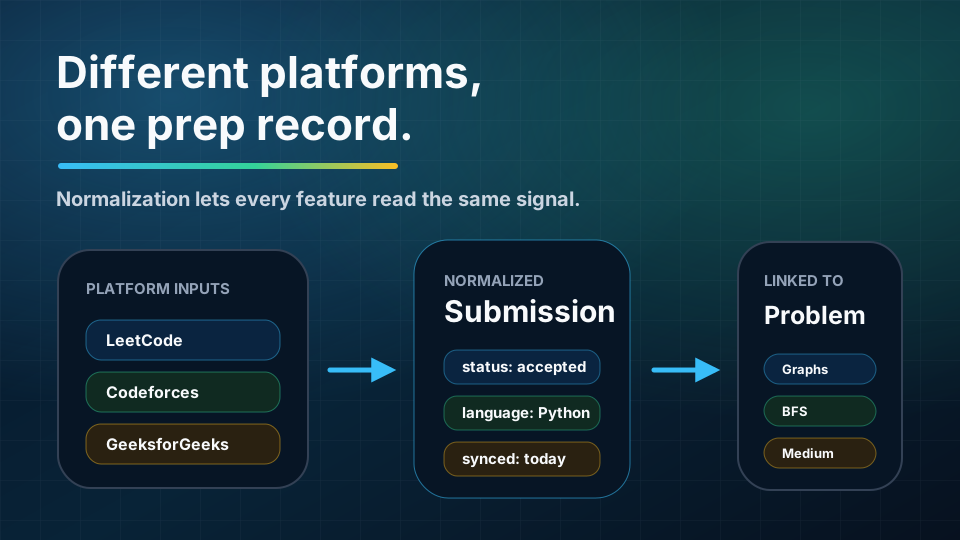
Different platforms describe submissions differently. Preptin normalizes them so the rest of the product can read one common prep signal.
A submission can include details such as:
- Platform name.
- Platform submission ID or source URL.
- Problem reference.
- Result status, such as accepted or wrong answer.
- Programming language.
- Runtime and memory, when available.
- Submitted time.
- Code payload, when captured.
- Sync source and sync timestamp.
- AI analysis fields, where available for the user and plan.
Not every platform provides every field in the same way. That is expected. Preptin uses what is available, keeps the solve connected to the problem where possible, and lets richer context fill in over time.
Accepted vs Attempted: What Counts?
Preptin can store different submission results, but accepted submissions carry special weight because they represent completed solves.
An accepted submission usually means:
- The problem can count toward solved progress.
- The related problem state can move forward.
- A matching recommendation can be treated as completed.
- A matching challenge can be completed.
- A revision plan may be created or refreshed.
- Readiness and profile signals may become more confident.
Wrong answers, runtime errors, compilation errors, and time limit errors can still be useful. They show attempts, friction, and possible mistake patterns. But accepted submissions are the clearest signal that a solve was completed.
This is why Preptin uses accepted solves carefully. A solved count should reflect real progress, not just opened problems or bookmarked intentions.
What Updates After a Submission Syncs
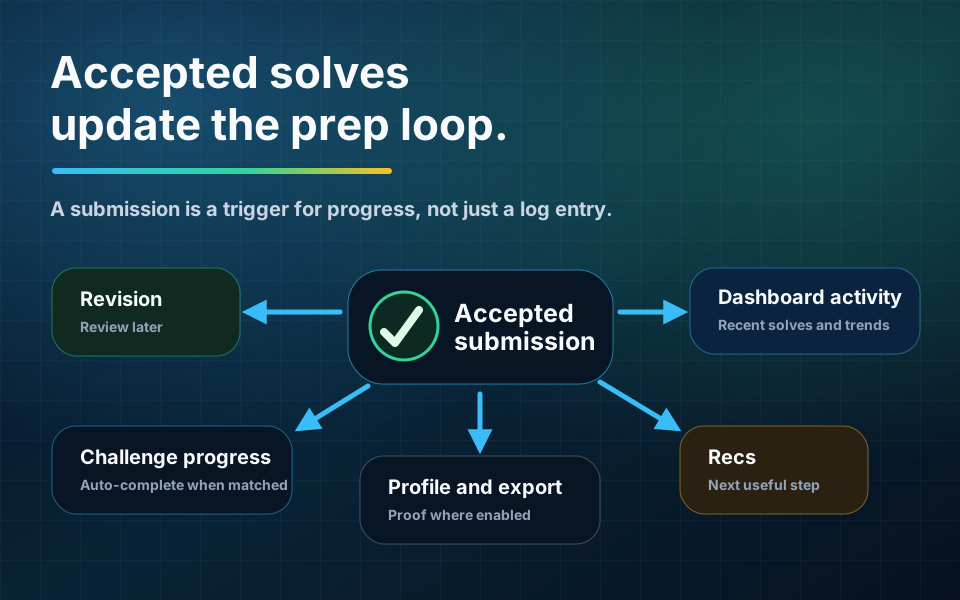
When a submission enters Preptin, it can update more than one page.
First, Preptin tries to connect the submission to a problem. If the problem is already known, the submission can link to the problem detail page, topics, patterns, difficulty, companies, and revision actions. If the problem needs more data, Preptin can still store the submission and enrich the problem later.
Next, Preptin updates the user's relationship with that problem. For an accepted solve, this can affect solved state, solve count, mastery context, and recent activity.
Then the accepted solve can feed downstream workflows:
- Dashboard activity and stats.
- Problem activity stats.
- Public profile aggregation.
- Revision planning.
- Recommendation completion.
- Prep Challenge or Daily Challenge completion, if the submission matches the active challenge.
- AI submission insights or enrichment, where available.
- GitHub export, where enabled and configured.
That is why submissions are not just a log. They are one of the main ways Preptin keeps guidance connected to real work.
How Submission History Helps You Review
Preptin keeps a submission history so you can return to what happened.
The submissions page is useful when you want to answer practical questions quickly:
- What did I submit recently?
- Which platform did this come from?
- Was the result accepted or failed?
- Which language did I use?
- What was the runtime or memory?
- Which problem was this tied to?
- Can I open the problem or review the submission detail?
Submission detail is useful because it keeps the solve connected to context. A submission can link back to the problem, show platform details, preserve code where available, and expose analysis or review notes where the feature is available.
This helps prevent a common prep problem: you remember solving something, but you cannot reconstruct what happened or what you learned from it.
How Submissions Power the Dashboard
The dashboard becomes more useful when Preptin can see accepted solves because it has something real to summarize.
Without submissions, the dashboard has limited evidence. It may know your goal and target company, but it cannot confidently understand your actual practice history.
With accepted submissions, the dashboard can start showing stronger signals:
- Recent activity.
- Solved progress.
- Topic coverage.
- Focus topics.
- Revision due.
- Recommendation quality.
- Readiness direction.
- Target-company practice alignment.
The dashboard does not become perfect after one solve. It improves as the signal grows.
The point is not to chase a vanity number. The point is to give Preptin enough real practice history to make better prep decisions.
How Submissions Feed Revision
Solving a problem once does not guarantee you will remember it later.
That is why accepted submissions can feed revision. When Preptin knows that a problem was accepted, it can use that solve as an anchor for future review.
Revision helps answer questions like:
- Can you still solve this after a few days?
- Did you understand the key pattern or only remember the code?
- Does this problem belong in a retry lane or clean-solve lane?
- Is this topic fading even though it looked solved before?
Accepted submissions give revision a starting point. They help Preptin bring back the right problems before they disappear from memory.
How Submissions Improve Recommendations
Recommendations are better when they know what you have actually solved.
If Preptin sees accepted submissions, it can avoid treating every candidate as new. It can make more useful decisions:
- Do not keep recommending problems you already solved.
- Prefer topics where coverage is thin.
- Use recent activity to understand momentum.
- Use accepted solves to complete matching recommendation events.
- Combine solved history with target-company context.
- Use revision due and weak areas as recommendation inputs.
This is why recommendations should improve over time. The more accurate the submission history, the less random the next step feels.
How Submissions Affect Challenges and Sheets
Accepted submissions can also connect to active practice flows.
If you are working on a Prep Challenge or Daily Challenge and the accepted submission matches the assigned problem, Preptin can mark that challenge progress automatically where supported.
If you are following an Interview Prep Sheet, accepted submissions can help reflect progress against problems in that path. You still may use manual progress states where supported, but synced accepted solves are stronger because they are backed by platform activity.
This keeps the practice loop simple:
- Pick a useful next action.
- Solve the problem on the platform.
- Let Preptin capture the accepted solve.
- Watch the connected product surfaces update.
Why Platform Verification Matters
Platform verification helps Preptin trust that a connected platform account belongs to you.
This matters because synced submissions can influence more than a private list. They may affect readiness, public profile proof, recommendations, revision, challenge completion, and future export workflows.
If Preptin asks you to verify a platform, it is trying to protect the quality of the signal.
Verification helps avoid questions like:
- Does this platform handle belong to the user?
- Should this activity count toward their progress?
- Can this progress be shown publicly?
- Should this history influence readiness or proof-of-work surfaces?
You can still use parts of Preptin while resolving verification issues, but verified platform activity is a stronger foundation for long-term tracking.
What If a Submission Is Missing?
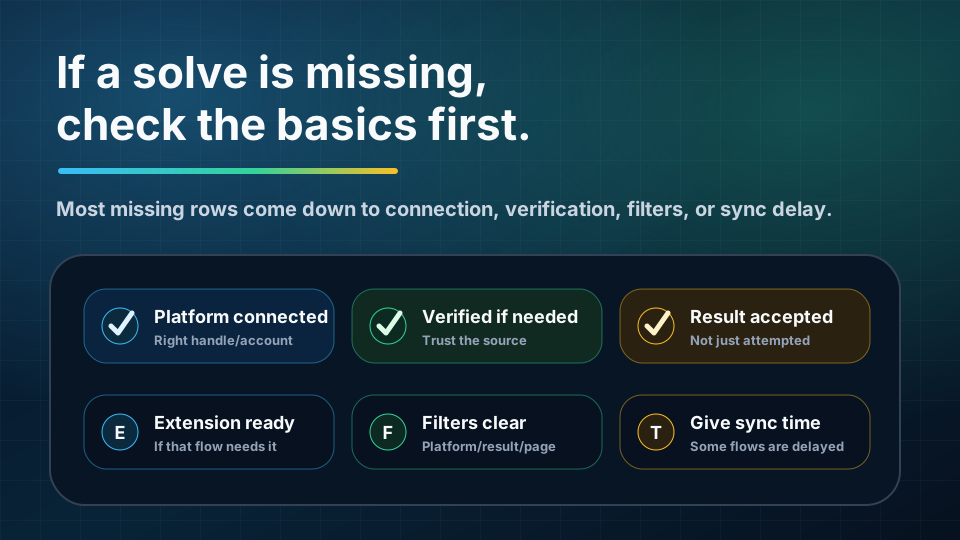
If you solved a problem but do not see it in Preptin, start with the simple checks.
Check whether:
- The platform account is connected.
- The platform handle is correct.
- The platform is verified, if verification is required.
- The submission result is actually accepted.
- The solve happened on a supported platform or supported flow.
- The browser extension is installed and enabled, if that flow needs it.
- The platform data needs more time to sync.
- Filters on the submissions page are hiding the row.
Sometimes a submission may appear before the full problem context is available. In that case, Preptin may still keep the submission and enrich the problem relationship later.
If a platform has temporary issues, the right approach is usually to keep solving and check again later. The product should not require you to stop your preparation just because one sync path needs time.
What Accepted Submissions Do Not Mean
Accepted submissions are important, but they are not magic.
An accepted solve does not always mean:
- You can solve the problem again under interview pressure.
- You understood every tradeoff.
- You can explain the pattern clearly.
- You are ready for every company that asks a related topic.
- You no longer need revision.
This is why Preptin combines submissions with revision, weak topics, recommendations, readiness, and target context.
The accepted submission is the evidence. The rest of the product helps interpret it.
How This Connects to Proof of Work
Accepted submissions can also support proof-of-work features.
Your public profile can use practice activity to show progress, platform connection status, recent solves, topic exposure, and preparation consistency. GitHub export can help preserve selected accepted solutions as a code trail when the workflow is enabled and configured.
These features are optional, but they depend on trustworthy activity. If your profile or exported repo says you solved something, that claim should be connected to real submission history where possible.
That is why submission tracking sits under so many parts of Preptin. It powers private guidance first, and it can also support public proof later.
A Practical Example
Imagine you are preparing for product-company SDE-1 interviews.
You connect your main coding platform and solve a graph problem. The result is accepted.
Preptin can now use that accepted submission to update several things:
- Your submission history shows the solve.
- The problem can appear as solved or recently practiced.
- The dashboard has a new activity signal.
- Topic coverage for graphs can improve.
- A matching recommendation can be treated as completed.
- A matching challenge can be marked complete where supported.
- A revision plan can bring the problem back later.
- Readiness and profile signals have more evidence.
One accepted solve does not make you interview-ready by itself. But it gives the system a real piece of practice history. Over time, those pieces become a clearer map of your preparation.
Frequently Asked Questions
Does Preptin track every submission automatically?
Not always. Tracking depends on the platform, connection state, verification state, extension flow, import support, and sync availability. The safest expectation is: connect the platforms you use, complete verification when asked, and use supported flows for the most reliable tracking.
Why does Preptin focus so much on accepted submissions?
Accepted submissions are the strongest signal that a problem was actually solved. Failed attempts can still be useful, but accepted solves are what most reliably update solved progress, revision anchors, challenge completion, and recommendation completion.
Can I still use Preptin without many submissions?
Yes. You can browse problems, follow recommendations, start challenges, use sheets, and configure setup. But Preptin becomes more personalized as accepted submissions accumulate.
What if my accepted solve is linked to the wrong problem?
That can happen when platform data is incomplete, problem metadata is still being hydrated, or a source problem is ambiguous. The important thing is to avoid treating one mismatch as the whole system being wrong. Preptin can improve problem mapping and enrichment over time.
Does Preptin store my code?
Preptin can store code payloads when captured by a supported submission flow. Code is used to preserve submission context and support analysis or export features where available. If a platform or flow does not provide code, the submission can still be useful through metadata such as problem, platform, result, language, and time.
Why do I need platform verification?
Verification helps confirm that the platform account belongs to you. That makes synced progress more trustworthy, especially when it influences readiness, public profile proof, challenge completion, or export workflows.
Do accepted submissions automatically update revision?
Accepted submissions can create or refresh revision workflows where the feature is available. Revision is still about remembering the problem later, not just recording that it was solved once.
Final Takeaway
Preptin tracks accepted submissions because accepted solves are the raw evidence behind smarter prep.
They help Preptin understand:
- What you solved.
- Where you solved it.
- Which topics and patterns were involved.
- What progress changed.
- What needs revision.
- What should be recommended next.
- What can become proof of work later.
The more reliable your submission history, the more useful Preptin becomes.
You keep solving where you already practice. Preptin turns those accepted solves into memory, direction, revision, readiness, and proof.